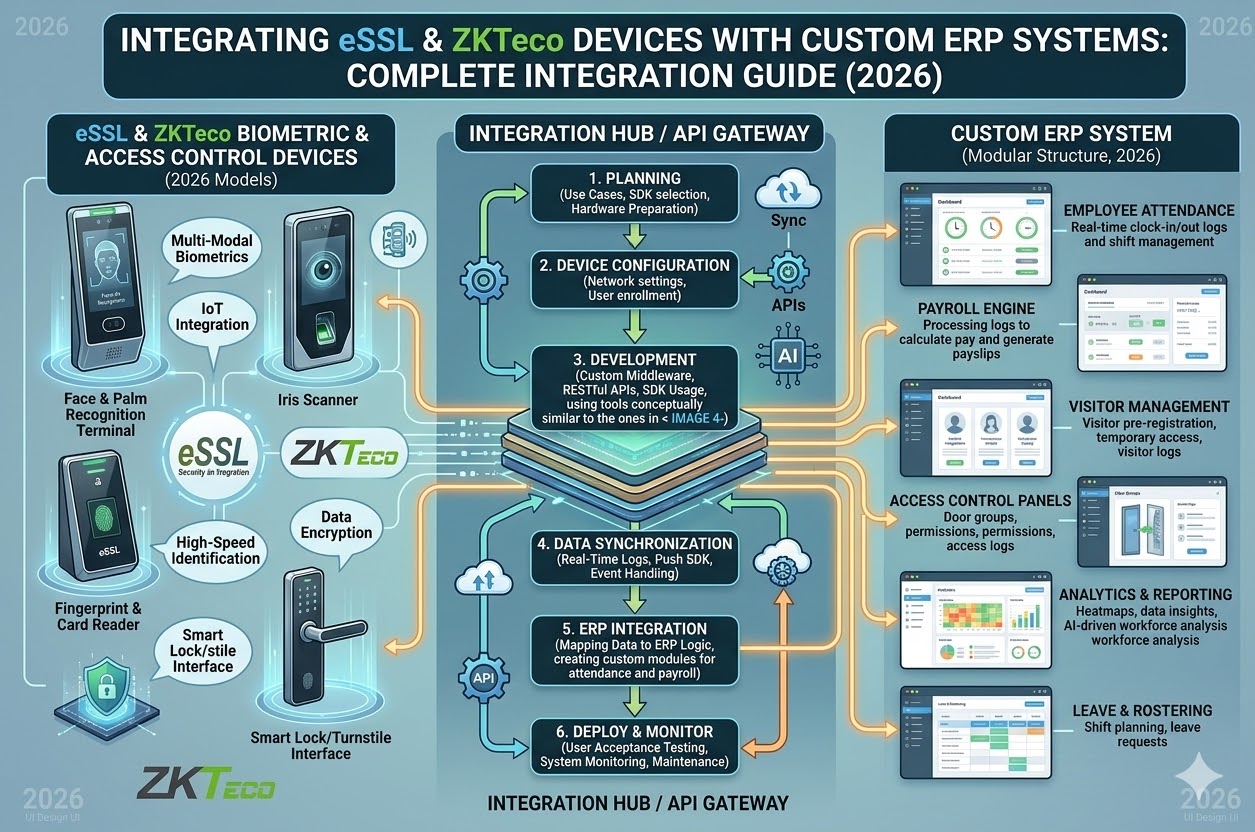
🔥 Integrating eSSL & ZKTeco Devices with Custom ERP Systems: Complete Integration 2026
📌 Introduction
In today’s digital business environment, biometric attendance devices like eSSL and ZKTeco are widely used. However, their true power is unlocked when integrated with custom ERP or HRMS systems.
Without integration, attendance data remains isolated.
With integration, it becomes a powerful tool for automation, payroll, and analytics.
🧠 What is Biometric ERP Integration?
Biometric ERP Integration is the process of connecting:
👉 Attendance Devices (eSSL / ZKTeco)
WITH
👉 ERP / HRMS Software
This enables:
- Automatic attendance syncing
- Real-time employee tracking
- Payroll automation
🚀 Why Integration is Required
⏳ 1. Eliminate Manual Data Entry
No need to export/import attendance data manually.
📊 2. Real-Time Attendance Sync
- Live data from device to software
- Instant reporting
💰 3. Payroll Automation
Attendance directly affects:
- Salary
- Overtime
- Leave
🔐 4. Data Accuracy & Security
- No human errors
- Secure data flow
📈 5. Centralized Management
Manage multiple devices & locations from one centralized system.
⚙️ How Integration Works (Simple Flow)
- Employee punches on biometric device
- Device stores attendance logs
- API / SDK fetches data
- Data sent to ERP / HRMS
- System processes payroll & reports
👉 Fully automated workflow
🔌 Integration Methods
🔹 1. API Integration (Recommended)
- Real-time data transfer
- Cloud-based systems
- Fast & scalable
🔹 2. SDK Integration
- Device-level programming
- Used in custom software
🔹 3. Push Data Method
Device pushes data to the server automatically.
🔹 4. Pull Data Method
ERP fetches data at specific intervals.
🧠 eSSL vs ZKTeco Integration
| Feature | eSSL | ZKTeco |
|---|---|---|
| API Support | Yes | Yes |
| Cloud Integration | Good | Excellent |
| Device Range | Medium | Wide |
| Accuracy | High | High |
| Popular Use | India SMEs | Global Enterprises |
🏭 Where This Integration is Used
- Offices & Corporate
- Factories & Manufacturing
- Warehouses
- Construction Sites
- Multi-branch Companies
🧠 Key Features After Integration
- Real-time attendance dashboard
- Auto shift & overtime calculation
- Leave management
- Payroll processing
- Mobile app access
- Multi-location control
⚠️ Common Challenges
- ❌ Network connectivity issues
- ❌ Wrong API configuration
- ❌ Time sync mismatch
- ❌ Poor device placement
✅ Best Practices for Successful Integration
- Use cloud-based HRMS
- Ensure stable internet connection
- Regular device sync
- Proper employee mapping
- Work with experienced integration partner
🚀 Advanced Integration (Next Level)
- GPS attendance + biometric sync
- Face recognition + ERP
- IoT-based workforce tracking
- AI-based attendance analytics
📊 Business Benefits
- ⏳ Save HR time
- 📉 Reduce errors
- 📊 Real-time insights
- 💰 Accurate payroll
- 🔐 Secure data
💡 Final Thought
“Biometric devices collect data—but integration converts that data into business intelligence.”
🚀 Call to Action
Upgrade your system with:
- eSSL / ZKTeco Biometric Devices
- Custom ERP / HRMS Integration
- Payroll Automation
- Cloud Dashboard
👉 Get a complete integration solution tailored to your business.